Monday, February 9, 2009

LG KM900 Arena multimedia powerhouse is as official as it gets

After a couple of leaks last week, it finally came time for LG to step up and officially unveil the KM900 Arena fully touch-operated handset. With a spanking new user interface our namesake seems destined to join the LG KC910 Renoir at the top of the line of multimedia handsets by the Korean company.

Peculiarly enough the official announcement brings less details about the phone than the leaks we witnessed just a few days ago. The company has chosen to keep the rest of its secrets for the World Mobile Congress, which starts next week in Barcelona.

What is certain for now is that the LG KM900 Arena sports GPS, Wi-Fi and the sweet 7.2 Mbps HSDPA. DivX and XviD support are also onboard and the new 3D interface, daringly dubbed S-Class, features some kind of rotating cube, much like the first implementation of the HTC-made TouchFLO UI.

While that is as far as official info goes, the info leaks of last week have revealed much more details about the handset. Seeing how accurate they have turned so far we see no reason to doubt them. That means that the LG KM900 Arena will come with an impressive 3" 262K color WVGA (800x480 pixels) touchscreen display. A 5 megapixel snapper will also be included and the handset is said to be able to record "DVD-quality" videos. We just hope this time LG got the frame rate right on that sweet D1 resolution.

The LG KM900 Arena will stand at 105.9 x 55.3 x 11.95mm and will weigh 105 grams, which are both quite acceptable considering the specifications.

Unfortunately there is no information about the availability or the pricing of the LG Arena ye

Tuesday, February 3, 2009

LG KF900 Prada review: Messenger wears Prada

For the original LG Prada the best way to travel in style was to travel light. But this time around it's carrying a full QWERTY suitcase packed with goodies. Top of the line functionality and an updated interface sound just the right kind of luggage to us. But good enough won't do if it's not glam enough. The new LG KF900 Prada may seem like the missing link between the techie high end and exclusive fashionware. But will HSDPA, Wi-Fi, QWERTY and DivX ring the right bell with the target audience?

Last week we saw Samsung ride on the Emporio Armani youth appeal and now we're back by the catwalk with the more moderate, perhaps even conservative, but nonetheless attractive, new Prada phone by LG.

Prada II Prada II Prada II
Official photos of LG KF900 Prada

And we've got loads to cover. Are the changed form factor and the QWERTY keyboard likely to backfire, and will performance ever be make or break for the fashion savvy? Rarely has a designer package promised so much action, so let's roll.

Key features:

  • 3-inch 262K-color capacitive touchscreen display of WQVGA resolution
  • Comfortable QWERTY keyboard
  • 5 megapixel autofocus camera with LED flash
  • D1 (720x480) resolution video recording at 30fps
  • Quad-band GSM/GPRS/EDGE support
  • Dual band 3G with HSDPA support
  • Wi-Fi
  • Responsive Flash-based interface with multi-touch support
  • Bluetooth v2.1 with A2DP and USB v2.0
  • Stylish and generous retail package
  • microSD memory card slot (verified to work with 16GB cards)
  • FM radio with RDS
  • Accelerometer sensor for screen auto rotate
  • TV-out
  • Office document viewer
  • DivX video support
  • Fashion-related content preloaded

Main disadvantages:

  • Two-year-old design
  • The large waistline doesn't match the fashionable image (but is OK for a QWERTY messenger)
  • Plastic build
  • No GPS (LG Renoir has it)
  • No XviD video support (LG Renoir has it)
  • Multi-touch has rather limited use
  • No Flash support in the web browser
  • Video recording is a letdown
  • High cost-to-features ratio (but OK for a premium fashion handset)

It was about time the first Prada phone by LG got an update, no doubt about that. Data transfers, connectivity, multimedia and user interface upgrades are spot on, but a hardware QWERTY keyboard was hardly essential. It's the Prada phone after all, and it probably needs all those buttons as much as the Sonim rugged phones need a Dolce & Gabbana carrying case.

Oh well, all-in-one QWERTY touchscreens are obviously the new black. Or so the LG KF900 Prada believes. Keen to find a niche within the niche, it lands right in the middle of not so friendly smartphone crowd. It's got the features to stand up to the XPERIA, HTC and the likes but it's kinda hard to imagine the ruthless WinMo machine melting with pity for the adorable, helpless, irresistible Prada.

Anyway, we think we'd be better off skipping our traditional round of window shopping this time. After all comparing the Prada to the smart messengers running Symbian or Windows Mobile will be irrelevant and unfair. There will be of course references to equally equipped messengers as we go, for both performance and looks, but that will be all.

LG KF900 Prada LG KF900 Prada LG KF900 Prada LG KF900 Prada
Meet the new Prada

We couldn't find any other handset willing to embrace the LG KF900 Prada concept. The QWERTY touchscreen all-in-one segment is a small niche to begin with, and the haute-couture label narrows it down even further. The new Prada phone by LG finds itself in a difficult position so let's see if it's got what it takes to make the best of it.

Saturday, January 31, 2009

Sony Ericsson XPERIA X1

Sony Ericsson XPERIA X1

There's a lot to fall for in Sony Ericsson XPERIA X1. Possibly the hottest looker of a PocketPC is also heavy on skill. Heavy enough to not just scratch out a living as a one-hit-wonder but aim for the WinMo top.

The extra solid metal looks, gorgeous screen and the right pinch of novelty called XPERIA panels look to us as good enough reasons for the X1 to be hyped and romanticized. By the way, romance or not, Sony Ericsson and HTC have hit their perfect shape with that one.

The XPERIA X1 is surely the most eagerly anticipated device in the world of Windows Mobile. Getting our review out was surely quite a wait too, we know. Better late than ever, as some folks say. We'll still have our say 'cause for the XPERIA it's a load of high expectations to live up to.

Sony Ericsson Sony Ericsson Sony Ericsson Sony Ericsson
Sony Ericsson XPERIA X1 official photos

Key features:

  • Quad-band GSM/GPRS/EDGE support plus HSDPA 7.2Mbps
  • 3-inch 65K-color WVGA touchscreen
  • Qualcomm MSM7200 528 Mhz CPU and 256 MB DDR SDRAM
  • 3.15 MP auto focus camera with VGA video recording
  • Four-row full QWERTY slide-out keyboard
  • Wi-Fi and built-in GPS receiver with A-GPS
  • X-Panels interface
  • Optical trackpad
  • Exquisite and solid metallic body
  • Standard miniUSB port and Bluetooth v2.0 with A2DP
  • microSD memory expansion
  • FM radio with RDS
  • 3.5mm standard audio jack
  • MS Office Mobile document editor
  • Opera 9.5 web browser
  • Excellent video playback performance
  • Superb audio quality

Main disadvantages:

  • Body is a bit on the bulky side
  • User interface is hardly thumb-optimized
  • Mediocre camera performance
  • No built-in accelerometer
  • Poor display sunlight legibility
  • Records low quality VGA@30fps video in 3GP format
  • No TV-out port
  • No full Flash support for the browser (hence no full-featured YouTube)

The XPERIA X1 is one of the best-equipped Windows Mobile devices to ever set foot on the market. But hey, is it not the most elaborate and charismatic PocketPC too? As to skills, the high-res 3" screen and the full QWERTY keyboard seem the most important parts of its magnificent ammo though its processing power is not to be neglected either.

Sony Ericsson XPERIA X1 Sony Ericsson XPERIA X1 Sony Ericsson XPERIA X1 Sony Ericsson XPERIA X1
Sony Ericsson XPERIA X1 in our office

Many devices find their identity in standing up to a rival. The XPERIA though is fatefully bound to always have one foot on alien ground. The haunting name for the X1 is HTC - manufacturer and main competitor.

As you probably guessed by yourselves the main alternative to the XPERIA X1 is HTC Touch Pro. It has a smaller screen than the XPERIA X1 and features a slightly lower resolution. In addition it is heavier and, if we were to be asked, not nearly as hot as the XPERIA.

However, the QWERTY keyboard of the Touch Pro is well ahead of what the X1 has to offer. The Touch Pro accelerometer and active magnetic stylus are small but nice touches that add to its allure. There are other advantages too, but we'll try to list them in the dedicated chapter of this review.

HTC Touch Pro
HTC Touch Pro

Furthermore, the Touch Pro had a nice two-month advantage since it hit the shelves back in August and this could be quite decisive for the sales. After all two months is quite a long time in the world of mobile phones, isn't it?

Let's not waste any more time now and get rolling with the actual review of Sony Ericsson XPERIA X1. Unboxing is this little jump ahead.

Friday, January 30, 2009

LG KF900 Prada review: Messenger wears Prada

LG KF900 Prada review: Messenger wears Prada

GSMArena team, 27 January 2009.
Pages: 12345678»

Tags: LG, Touch UI

For the original LG Prada the best way to travel in style was to travel light. But this time around it's carrying a full QWERTY suitcase packed with goodies. Top of the line functionality and an updated interface sound just the right kind of luggage to us. But good enough won't do if it's not glam enough. The new LG KF900 Prada may seem like the missing link between the techie high end and exclusive fashionware. But will HSDPA, Wi-Fi, QWERTY and DivX ring the right bell with the target audience?

Last week we saw Samsung ride on the Emporio Armani youth appeal and now we're back by the catwalk with the more moderate, perhaps even conservative, but nonetheless attractive, new Prada phone by LG.

Prada II Prada II Prada II
Official photos of LG KF900 Prada

And we've got loads to cover. Are the changed form factor and the QWERTY keyboard likely to backfire, and will performance ever be make or break for the fashion savvy? Rarely has a designer package promised so much action, so let's roll.

Key features:

  • 3-inch 262K-color capacitive touchscreen display of WQVGA resolution
  • Comfortable QWERTY keyboard
  • 5 megapixel autofocus camera with LED flash
  • D1 (720x480) resolution video recording at 30fps
  • Quad-band GSM/GPRS/EDGE support
  • Dual band 3G with HSDPA support
  • Wi-Fi
  • Responsive Flash-based interface with multi-touch support
  • Bluetooth v2.1 with A2DP and USB v2.0
  • Stylish and generous retail package
  • microSD memory card slot (verified to work with 16GB cards)
  • FM radio with RDS
  • Accelerometer sensor for screen auto rotate
  • TV-out
  • Office document viewer
  • DivX video support
  • Fashion-related content preloaded

Main disadvantages:

  • Two-year-old design
  • The large waistline doesn't match the fashionable image (but is OK for a QWERTY messenger)
  • Plastic build
  • No GPS (LG Renoir has it)
  • No XviD video support (LG Renoir has it)
  • Multi-touch has rather limited use
  • No Flash support in the web browser
  • Video recording is a letdown
  • High cost-to-features ratio (but OK for a premium fashion handset)

It was about time the first Prada phone by LG got an update, no doubt about that. Data transfers, connectivity, multimedia and user interface upgrades are spot on, but a hardware QWERTY keyboard was hardly essential. It's the Prada phone after all, and it probably needs all those buttons as much as the Sonim rugged phones need a Dolce & Gabbana carrying case.

Oh well, all-in-one QWERTY touchscreens are obviously the new black. Or so the LG KF900 Prada believes. Keen to find a niche within the niche, it lands right in the middle of not so friendly smartphone crowd. It's got the features to stand up to the XPERIA, HTC and the likes but it's kinda hard to imagine the ruthless WinMo machine melting with pity for the adorable, helpless, irresistible Prada.

Anyway, we think we'd be better off skipping our traditional round of window shopping this time. After all comparing the Prada to the smart messengers running Symbian or Windows Mobile will be irrelevant and unfair. There will be of course references to equally equipped messengers as we go, for both performance and looks, but that will be all.

LG KF900 Prada LG KF900 Prada LG KF900 Prada LG KF900 Prada
Meet the new Prada

We couldn't find any other handset willing to embrace the LG KF900 Prada concept. The QWERTY touchscreen all-in-one segment is a small niche to begin with, and the haute-couture label narrows it down even further. The new Prada phone by LG finds itself in a difficult position so let's see if it's got what it takes to make the best of it.

Join us on the next page, as we explore the exterior and ergonomics.

Tuesday, January 27, 2009

RIM BlackBerry Storm (9530) Phone

RIM BlackBerry Storm (9530) Phone


Released for Verizon Wireless, the RIM BlackBerry Storm offers 'clickable' touch-screen technology that responds much like a physical keyboard. It supports single-touch, multi-touch and gestures for application navigation. The BlackBerry Storm has high-speed EV-DO Rev. A technology for fast Internet browsing and multimedia applications. It integrates a full HTML browser that works in portrait or landscape orientation. Navigate websites with the touch-screen interface by double tapping to zoom in and sliding the fingers to scroll and pan. Icons access websites, switches between Page View and Column View and toggles between Pan mode and Cursor mode.

RIM BlackBerry Storm (9530) Features


  • Sleek, elegant design with contoured corners, stainless steel back and chrome accents surrounding its large (3.25-inch) glass lens
  • Built-in 3.2-megapixel camera with variable zoom, auto focus and a powerful flash that also provides continuous lighting when recording video
  • Built-in GPS supports location-based applications and services, as well as geotagging of photos
  • 1 GB of onboard memory storage and a microSD/SDHD memory card slot that supports up to 16 GB of additional storage
  • Media player plays movies smoothly in full screen mode, displays pictures and slideshows quickly and manages an entire music collection
  • A 3.5 mm stereo headset jack, support for Bluetooth stereo audio profile (A2DP/AVRCP) and dedicated volume controls
  • An ambient light sensor that automatically adjusts backlighting for ideal screen viewing and an accelerometer that allows customers to view applications in either portrait or landscape mode by simply rotating the handset
  • BlackBerry Internet Service, BlackBerry Unite!, BlackBerry Professional Software and BlackBerry Enterprise Server support
  • Preloaded DataViz Documents to Go allows users to edit Microsoft Word, Excel and PowerPoint files directly on the handset
  • Removable and rechargeable 1400 mAhr battery that provides approximately six hours of talk time on 3G networks and 15 days of standby time

Monday, January 26, 2009

Step-by-Step Guide to Unlock iPhone 3G

Step-by-Step Guide to Unlock iPhone 3G


The iPhone dev team released the much awaited software solution to unlock iPhone 3G so that users can use any GSM carrier's SIM, a perfect New Year gift for all those waiting to unlock their iPhone 3G.

Here is a detailed step-by-step guide to unlock iPhone 3G using Dev team's yellowsn0w application.

Some important points to note before we start:

  • Hacking your iPhone could void its warranty.
  • Dev team's yellowsn0w application is still in beta and has not worked for all iPhone 3G users but they are working hard to fix the issues and have been releasing new versions of their application.
  • Since one of the important requirements to unlock iPhone 3G is to upgrade to iPhone firmware 2.2 (as it exclusivley works with baseband firmware 02.28.00 which comes bundled with firmware 2.2), you need to be aware that iPhone firmware 2.2 breaks Turbo SIM (in case you are using it) - the hardware method to unlock iPhone 3G so if Dev team's software method which is still in beta does not work you might not be able to use your iPhone 3G.
  • This step-by-step guide is exclusively to unlock iPhone 3G. We haven't tried it with the 1st generation iPhone. We would sugges you use QuickPwn to unlock the 1st gen iPhone.
  • The current version of yellowsn0w does not support SIMs with PIN enabled. So please disable any PIN you may have on that SIM before using this guide. The Dev team are currently working to support SIMs with PIN so this is a temporary limitiation.
  • If you want to know if Dev team's unlocking solution has worked for your carrier, please check the Yellowsn0w report.

Preparatory steps before unlocking your iPhone 3G:

Once your iPhone 3G running iPhone firmware 2.2 (with baseband firmware 02.28.00) is jailbroken, you are ready to unlock iPhone 3G.

Unlock iPhone 3G using yellowsn0w:

  1. Launch Cydia from your iPhone 3G's home screen.
  2. You need to add the source of the yellowsn0w application. So tap Manage, one of the tabs at the bottom and then tap Sources.


  3. Tap the “Edit” button on the top-right corner of the screen.


  4. Then tap on the “Add” button on the top-left corner of the screen.


  5. You’ll be prompted to add a Cydia/APT URL. Enter http://apt9.yellowsn0w.com/ as the source URL for the yellowsn0w application and then tap the "Add Source" button.


  6. Once the source has been added press the "Return to Cydia" button at the bottom of the screen.


  7. Then tap the "Done" button at the top-right of the screen. This completes the steps to add the source for the yellowsn0w application so you can install it.


  8. Tap on the apt9.yellowsn0w.com source that was just added from the list of sources.


  9. Tap on apt9.yellowsn0w.com again from the list of packages.


  10. You will get an option to install the yellowsn0w application. Tap the "Install" button on the top-right corner of the screen.


  11. Tap the "Confirm" button on the top-right corner of the screen.


  12. This will install the yellowsn0w application, you will see the progress on the next screen and the "Return to Cydia" button will come up once installation is complete.


  13. Tap on the "Return to Cydia" button and press the "Home" button on your iPhone 3G to go back to the home screen.
  14. You need to reboot your iPhone 3G so that the yellowsn0w application which is a small daemon is launched on boot up. Press the “Sleep” button and hold it until you see the “Slide to power off” message. Then slide to switch off the iPhone.
  15. Once your iPhone 3G has shutdown, insert the desired SIM card and restart your iPhone 3G.
  16. Once your iPhone boots up and you see the “Slide to Unlock” screen, wait for around 10 to 15 seconds (may be more) to see if your iPhone 3G picks up the carrier signal.
  17. The Dev team has reported that there is a known issue with SIM cards that have STK (SIM Toolkit) application menus. So if your iPhone 3G doesn't pick up the carrier signal after reboot then try to try to pull out the SIM card and re-insert it, wait for another 10 - 15 seconds and see if your iPhone 3G picks up the signal of the carrier.

If it does then you have successfully unlocked your iPhone 3G.

Some Tips to unlock iPhone 3G if the above procedure does not work:

If the above guide did not unlock your iPhone 3G, then try some of the workarounds mentioned below as it has helped some readers to successfully unlock their iPhone 3G.

Method 1 (via Hackint0sh):

  1. Airplane mode on.
  2. Airplane mode off, you should see "searching" and should pick up the carrier's signal.

Method 2 (via Hackint0sh):

  1. Launch Moble terminal app (you can install it via Cydia).
  2. Type yellowsn0w -r wait for a moment 10 sec
  3. Type yellowsn0w -c wait for a moment 10 sec if you get NO SERVICE wait until u get 5 dot and run it again if you don't encounter NO SERVICE just run next command
  4. Type yellowsn0w -r
  5. Type yellowsn0w -a if you get busy message in under 15 sec and don't see NO SERVICE it's unsucesfull and you have to do -r and -a again until it loads to NO SERVICE and wait untill it changes to 5 dots and wait for 10sec
  6. Airplane mode on (keep it in that mode for more than 10 seconds)
  7. Airplane mode off, you should see "searching" and should pick up the carrier's signal.

If that didn't help:

  1. Type yellowsn0w -r once and after 5 sec wait 1 min.
  2. Airplane mode on (keep it in that mode for more than 10 seconds).
  3. Airplane mode off, you should see "searching" and should pick up the carrier's signal.

Note: Ignore the Unknown message (0xe3ff8000), the command still works even if you get it.

Method 3:

This was suggested by Anton, one of our readers (Thanks Anton!)

  1. Install BossPrefs via Cydia.
  2. Disable all Functions with BossPrefs (don't worry if you can't disable EDGE)
  3. Reboot your Phone with BossPrefs (not in the normally way - important!)
  4. Wait 1.30 min when you see the Lockscreen.
  5. Take out your Sim and re-insert it.
  6. Wait a moment (30 seconds).
  7. Go on Settings and Turn on the Airplane mode (keep it in that mode for more than 10 seconds).
  8. Turn off Airplane Mode.
  9. Your iPhone 3G should pick up the carrier's signal.

Method 4 (via YouTube, user reda92):

  1. Reset Network Settings. 99% of your success rate will depend on this. (You can find this in settings - general and to the bottom you'll see a "reset" menu in which you can find this)
  2. Reboot your iPhone
  3. Wait a little over a min.
  4. Remove your SIM card and re-insert it back in
  5. Wait 30 sec.
  6. Turn on Airplane mode and wait 10 sec. (This is important as well)
  7. Turn of Airplane mode, you should see "searching" and should pick up the carrier's signal.

If these workarounds did not help unlock your iPhone 3G, then report the problem to the Dev team using this link.

Update (Jan 7th, 2009):

Dev Team have updated their yellowsn0w app to unlock iPhone 3G. It fixes even more problems.

Please don't forget to drop us a line to tell us if you were able to successfully unlock your iPhone 3G using this guide or the workarounds. If you have any tips for fellow readers don't forget to mention them in the comments as well.

Thursday, January 22, 2009

HTC Touch Cruise 09 officially unveiled, helps you find your way


Today HTC announced a new WinMo-powered device with GPS navigation as its main features. Photos of the device, nicknamed Iolita have already leaked online on several occasions but now it makes its official debut as HTC Touch Cruise 09.

Yeah that's right - the marketing department over at the Taiwanese company apparently found it too hard of a job to think of a new name for the handset and reused a 2-year-old one (check the original HTC Touch Cruise).

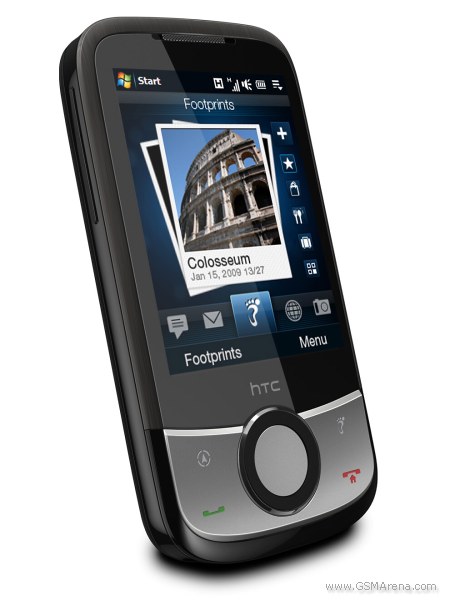
Much like its 02 twin brother - XDA Guide the HTC Touch Cruise 09 strongest asset (and selling point) is GPS navigation. It packs a brand new Advanced Navigation System and the new HTC Footprints location-based services. Those include geo-tagging of photos, sound clips etc. Full turn-by-turn navigation capabilities are said to be included in the device for no extra charge and a car cradle will also be provided in the retail package.

HTC Touch Cruise 09 HTC Touch Cruise 09 HTC Touch Cruise 09
HTC Touch Cruise 09

The Windows Mobile 6.1 Professional powered Touch Cruise uses a 528 MHz Qualcomm MSM 7225 processor and 256 MB of RAM. There is also 512 MB of ROM on board, that expandable through the microSD card slot. Some of the other features the new Cruise include the sweet TouchFLO ready to roll on the 2.8" 65K color QVGA touchscreen, 3G with HSDPA, Wi-Fi and Bluetooth (2.0 and A2DP). A 3.2 megapixel fixed focus snapper that is in charge of the photography.

The HTC Touch Cruise 09 will start shipping this spring with an estimated retail price of 460 euro (600 US dollars).